9. The forward pass#
Now that we understand how to work with computational graphs in mlfz, it’s time to pull back the curtain and see how they work on the inside. After all, this is what we’re here for. (At least, it’s why I’m writing this.)
As we’ve seen it before, Scalar implements a node in a computational graph. Thus, it must keep track of three attributes:
a numeric value,
the backwards gradient,
and the list of incoming edges.
This chapter progressively implements the Scalar class via adding more and more features. Note that most of the versions here won’t have the full functionality of mlfz.nn.scalar.Scalar. The full source can be found on GitHub, but the Python code is not exactly a linear front-to-back text, so we’ll unravel it one feature at a time.
Here we go:
from typing import List


class Scalar:
    def __init__(self, value: float, prevs: List = None):
        self.value = value
        self.prevs = prevs if prevs is not None else []
        self.backwards_grad = 0

    def __repr__(self):
        return f"Scalar({self.value})"
(I have also added a simple string representation for readability.) Now, we add the meat to the bones. The first thing to do: build the computational graph via operations.
9.1. Building the graph#
We are already familiar with the Scalar interface: the computational graph is built via appling operations and functions.
from mlfz.nn.scalar import Scalar as Scalar_final

x = Scalar_final(1)
y = Scalar_final(2)

x + y
Scalar(3)
(To avoid confusion, mlfz.nn.scalar.Scalar is imported as Scalar_final.)
How is this done? By overloading the operations via implementing the magic methods. In the object oriented Python, there are several of them:
addition
a + bis done via__add__,subtraction
a - bis via__sub__,negation
-ais via__neg__,multiplication
a * bvia__mul__,division
a / bvia__truediv__,exponentiation
a ** bvia__pow__,
and many more. I’ll do the __add__, you’ll do the rest in an exercise. We’ll code first, discuss later.
class Scalar(Scalar):
    # ...

    def __add__(self, other):
        return Scalar(
            value=self.value + other.value,
            prevs=[self, other],
        )

    # ...
Remark 9.1 (Implementing classes, one method at a time.)
As this book is written in Jupyter Notebooks, we can iteratively define classes method by method. To avoid writing out the all the previously implemented methods each time we add a new one, we inherit the new Scalar class from the old one. Keep this in mind, as I’ll use this trick later.
The __add__ method simply initializes a new Scalar instance, formed from the operands. (In this case, self and other.)
x = Scalar(1)
y = Scalar(2.5)
z = x + y
z.value
3.5
Now, we have a way to track the nodes preceeding z:
z.prevs
[Scalar(1), Scalar(2.5)]
Can you implement the rest or the operations? Give them a go before revealing the answer.
class Scalar(Scalar):
    # ...

    def __add__(self, other):
        return Scalar(
            value=self.value + other.value,
            prevs=[self, other],
        )

    # implement these methods along the lines of __add__:
    def __mul__(self, other):
        pass

    def __truediv__(self, other):
        pass

    def __pow__(self, exponent):
        pass

    def __neg__(self):
        pass

    def __sub__(self, other):
        pass

    # ...
Here’s the solution:
Show code cell source
class Scalar(Scalar):
    def __mul__(self, other):
        return Scalar(
            value=self.value * other.value,
            prevs=[self, other],
        )

    def __truediv__(self, other):
        return Scalar(
            value=self.value / other.value,
            prevs=[self, other],
        )

    def __pow__(self, exponent):
        return Scalar(
            value=self.value ** exponent.value,
            prevs=[self, exponent],
        )

    def __neg__(self):
        return Scalar(
            value=-self.value,
            prevs=[self],
        )

    def __sub__(self, other):
        return self + (-other)
Testing:
x = Scalar(2)
y = Scalar(3)

print(f"{x} + {y} = {x + y}")
print(f"{x} * {y} = {x * y}")
print(f"{x} / {y} = {x / y}")
print(f"{x} ** {y} = {x ** y}")
print(f"{x} - {y} = {x - y}")
print(f"-{x} = {-x}")
Scalar(2) + Scalar(3) = Scalar(5)
Scalar(2) * Scalar(3) = Scalar(6)
Scalar(2) / Scalar(3) = Scalar(0.6666666666666666)
Scalar(2) ** Scalar(3) = Scalar(8)
Scalar(2) - Scalar(3) = Scalar(-1)
-Scalar(2) = Scalar(-2)
9.1.1. Interoperability with Python’s number types#
At its current state, operations with Python’s number types are not supported. Check this out:
Scalar(1) + 2
---------------------------------------------------------------------------
AttributeError                            Traceback (most recent call last)
Cell In[10], line 1
----> 1 Scalar(1) + 2

Cell In[7], line 6, in Scalar.__add__(self, other)
      4 def __add__(self, other):
      5     return Scalar(
----> 6         value=self.value + other.value,
      7         prevs=[self, other],
      8     )

AttributeError: 'int' object has no attribute 'value'
The source of this AttributeError is that the expression Scalar(1) + 2 calls Scalar.__add__, with arguments Scalar(1) and 2. As 2 is not a Scalar object, we immediately run upon an issue.
How can we solve this? One simple way is to check the Scalar-ness of the second operand, and make the appropriate conversions if needed.
class Scalar(Scalar):
    def __add__(self, other):
        if not isinstance(other, Scalar):
            other = Scalar(other)

        return Scalar(
            value=self.value + other.value,
            prevs=[self, other],
        )

    def __mul__(self, other):
        if not isinstance(other, Scalar):
            other = Scalar(other)

        return Scalar(
            value=self.value * other.value,
            prevs=[self, other],
        )

    # ...
    # the other operations are fixed similarly
    # ...
Does it work?
Scalar(1) + 2
---------------------------------------------------------------------------
AttributeError                            Traceback (most recent call last)
Cell In[11], line 1
----> 1 Scalar(1) + 2

Cell In[7], line 6, in Scalar.__add__(self, other)
      4 def __add__(self, other):
      5     return Scalar(
----> 6         value=self.value + other.value,
      7         prevs=[self, other],
      8     )

AttributeError: 'int' object has no attribute 'value'
Yes, it does!
9.1.2. Operations left and right#
Now that we’ve enabled operations with vanilla Python number types, can you guess the output of the expression 2 + Scalar(1)?
Check this out.
2 + Scalar(1)
---------------------------------------------------------------------------
TypeError                                 Traceback (most recent call last)
Cell In[12], line 1
----> 1 2 + Scalar(1)

TypeError: unsupported operand type(s) for +: 'int' and 'Scalar'
What happened?
In Python, the expression a + b is equivalent to the function call a.__add__(b). In our case, the left operand is a number, and its __add__ method doesn’t support Scalars. However, there’s another magic method called __radd__, implementing the addition from the left side.
What does that mean? That Python falls back to __radd__ whenever __add__ doesn’t work. To be precise, whenever you call a + b,
a.__add__(b)is called,and if it fails, Python attempts to call
b.__radd__(a),and if it fails as well, a
TypeErroris thrown.
So, let’s add __radd__.
class Scalar(Scalar):
    def __add__(self, other):
        if not isinstance(other, Scalar):
            other = Scalar(other)

        return Scalar(
            value=self.value + other.value,
            prevs=[self, other],
        )

    def __radd__(self, other):
        return self.__add__(other)

    # ...
Does it work?
2 + Scalar(1)
Scalar(3)
Again, it does!
There are magic methods corresponding to the other operations as well:
__rmul__,__rtruediv__,and
__rsub__.
Can you implement them as an exercise?
class Scalar(Scalar):
    def __neg__(self):
        return (-1) * self

    def __sub__(self, other):
        return self + (-other)

    def __radd__(self, other):
        return self.__add__(other)

    # implement these methods along the lines of __radd__:
    def __rmul__(self, other):
        pass

    def __rtruediv__(self, other):
        pass

    def __rsub__(self, other):
        pass
Here’s the solution:
Show code cell source
class Scalar(Scalar):
    def __neg__(self):
        return (-1) * self

    def __sub__(self, other):
        return self + (-other)

    def __radd__(self, other):
        return self.__add__(other)

    def __rmul__(self, other):
        return self * other

    def __rtruediv__(self, other):
        if not isinstance(other, Scalar):
            other = Scalar(other)

        return other / self

    def __rsub__(self, other):
        return other + (-self)
Testing:
x = 2
y = Scalar(3)

print(f"{x} + {y} = {x + y}")
print(f"{x} * {y} = {x * y}")
print(f"{x} / {y} = {x / y}")
print(f"{x} - {y} = {x - y}")
2 + Scalar(3) = Scalar(5)
---------------------------------------------------------------------------
AttributeError                            Traceback (most recent call last)
Cell In[17], line 5
      2 y = Scalar(3)
      4 print(f"{x} + {y} = {x + y}")
----> 5 print(f"{x} * {y} = {x * y}")
      6 print(f"{x} / {y} = {x / y}")
      7 print(f"{x} - {y} = {x - y}")

Cell In[16], line 12, in Scalar.__rmul__(self, other)
     11 def __rmul__(self, other):
---> 12     return self * other

Cell In[8], line 4, in Scalar.__mul__(self, other)
      2 def __mul__(self, other):
      3     return Scalar(
----> 4         value=self.value * other.value,
      5         prevs=[self, other],
      6     )

AttributeError: 'int' object has no attribute 'value'
9.1.3. Defining functions for nodes#
So far, we’ve only added support for arithmetic operations such as +, -, *, /, and **. What about functions? After all, machine learning models are defined by mathematical expressions such as \( f(x) = \sigma(ax + b) \), where
is the sigmoid function. How to do that with Scalar instances?
There are multiple potential approaches; we’ll go with functions that take and return Scalar objects. This is simpler than you think. Here we go:
import math


def exp(x: Scalar) -> Scalar:
    return Scalar(
        value=math.exp(x.value),
        prevs=[x]
    )
x = Scalar(2)
y = exp(x)
y
Scalar(7.38905609893065)
y.prevs
[Scalar(2)]
In mlfz, these can be found at mlfz.nn.scalar.functional. Nothing fancy, just plain old sin, cos, sigmoid, relu, and other machine learning-related functions.
Exercise time! Your job is to implement the sigmoid function below.
def sigmoid(x: Scalar) -> Scalar:
    pass
And the solution is:
Show code cell source
def sigmoid(x: Scalar) -> Scalar:
    return Scalar(
        value=1 / (1 + math.exp(-x.value)),
        prevs=[x]
    )
This works as expected.
sigmoid(Scalar(3))
Scalar(0.9525741268224334)
9.2. The forward pass#
Let’s put all of this together and check how the computational graph is built upon applying the operations.
For that, we need a function that recursively traverses all parent nodes and returns the directed graph, using the Digraph object from the graphviz library.
from graphviz import Digraph


def get_digraph(x):
    digraph = Digraph()

    def register_node(x):
        digraph.node(str(id(x)), f"{x.value: 0.4g}")
        for prev in x.prevs:
            digraph.edges([(str(id(prev)), str(id(x)))])
            register_node(prev)

    register_node(x)

    return digraph
We’ll study the simple computational graph defined by
where \( \sigma(x) = 1/(1 + e^{-x}) \) is the familiar sigmoid function.
a = Scalar(0.2)
b = Scalar(-1.8)
x = Scalar(0.6)

y = a * x + b
s = sigmoid(y)
z = s + a
(The above is equivalent to the expression sigmoid(a * x + b) + a, but I choose to break it up into smaller components to assign variables to all intermediate results.)
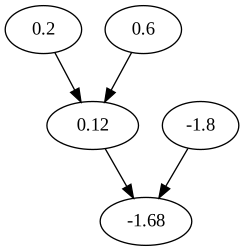
First, y = a * x + b is computed.
get_digraph(y)
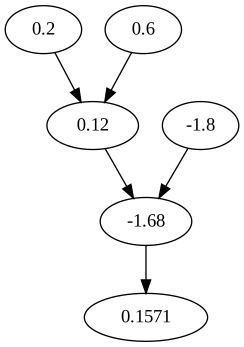
The second step is the application of the sigmoid function, adding a child node to y.
get_digraph(s)
To make things more exciting, we add another node, but this time, we attach it to s = sigmoid(y) and the input node a = Scalar(0.2).
get_digraph(z)
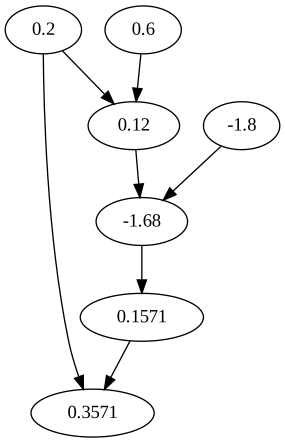
What we’ve seen here is the forward pass corresponding to the computational graph of sigmoid(a * x + b) + a: the input nodes a, b, and x are propagated through the graph to calculate the value z = sigmoid(a * x + b) + a, one step at a time.
To train neural networks, we utilize the gradient algorithm that, in turn, requires us to compute the derivative of the final node with respect to all other nodes. This is done in the backward pass, and we’ll learn what it is in the next chapter.